
Blogs & Articles
Read useful articles, tips, and updates about computers, IT solutions, and technology trends.
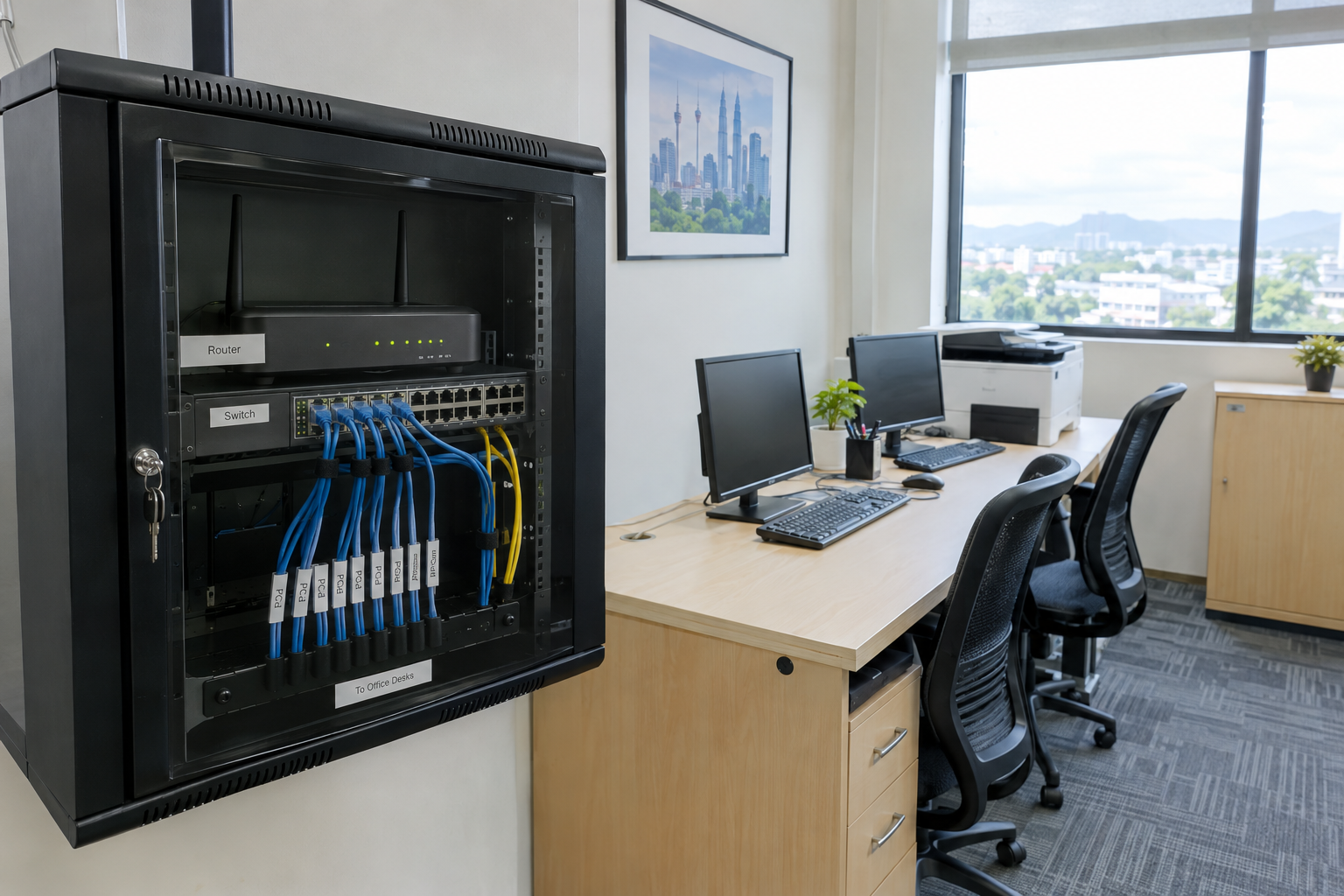
A suitable small office network setup in Malaysia starts with the office workflow, not with buying a router. First list the people, computers, printers, servers, wireless devices and remote-access needs. Then map the connection from the internet provider to the office router, switches, wireless access points and end devices. This approach helps you choose equipment that fits the present office while leaving room for controlled growth.
A business network is more than a collection of cables and devices: it supports daily operations such as file access, printing, accounting work, internet use and communication. Before installation, record the number and location of wired computers, laptops, printers, phones, servers, storage devices and guest devices. Note which rooms need wired connections and where wireless coverage is important.
Also record the internet service, the location of the incoming connection and whether staff need access to office resources while working remotely. A branch office or remote worker may use a wide area network (WAN) or a virtual private network (VPN) to connect to corporate resources, but the office still has its own local area network (LAN). Server access and VPN requirements should be confirmed with the relevant administrator or qualified network professional before equipment is selected.
This inventory becomes the basis for a small-business network design. It also gives an installer a clearer brief than a request for “better Wi-Fi” or “a faster network”.
The usual data flow is from the internet service provider to the office devices. An incoming fibre or broadband connection reaches the modem or optical network terminal (ONT), which converts the outside service signal into an Ethernet connection. That Ethernet connection feeds the router’s internet or WAN port. Wired endpoints connect to the router or an Ethernet switch, while wireless devices connect through a wireless access point.
| Stage | Equipment role | Devices served | Planning question |
|---|---|---|---|
| 1. Internet service | ISP connection and modem/ONT | Office network gateway | Where does the provider connection enter the premises? |
| 2. Routing | Router connects the office network to the internet and manages traffic between networks | Switches, access points and internal devices | Does the router support the required security, guest access and remote-access design? |
| 3. Wired switching | Switch connects multiple devices on the local network | Desktop computers, printers, servers and access points | How many ports are needed now, and how many should remain available? |
| 4. Wireless access | Access point provides or extends wireless coverage | Laptops, phones, tablets and approved guest devices | Which rooms need reliable Wi-Fi, and will one access point cover them? |
| 5. Endpoints | Computers and other devices use the configured network | Staff, printers, servers and business applications | Which devices may communicate with each other? |
Routers, switches and wireless access points are not interchangeable. A router handles the boundary between networks, a switch expands wired local connections, and an access point supplies wireless connectivity. A small office network can therefore require a combination of routers and switches, with wireless equipment added according to the building layout.
A basic office with a few trusted devices may need only a straightforward configuration. However, “simple” does not mean that security, documentation or testing can be skipped. As users, devices and business systems increase, a managed design becomes more useful because it can support monitoring and traffic control.
| Office condition | Suitable planning direction | Trade-off or exception |
|---|---|---|
| Small number of staff and basic internet, printing and file use | Simple router, wired switch and wireless access arrangement | Confirm spare ports, wireless coverage and administrator access before installation. |
| Many users or expected growth | Business-oriented equipment with management and traffic-control functions | More configuration is required, so document settings and responsibilities. |
| Office server or shared business system | Plan server access separately from ordinary user and guest access | Do not assume a default network is appropriate; validate access rules and application requirements. |
| Visitors or unmanaged devices | Create a guest network with deliberate limits on internal access | Guest access must be tested rather than assumed to be isolated. |
| Remote staff or branch connectivity | Confirm WAN, VPN and authentication requirements | Remote access can change the router, firewall and support requirements. |
Guest devices, user computers, servers and administrator workstations should not automatically be treated as one group. Malaysian NC4 guidance explains that a flat office network can allow an attacker to move from a compromised endpoint to more important systems. It recommends separating groups, applying firewall or access-control rules between zones, limiting lateral protocols such as SMB, RDP, WMI and WinRM, and validating that the rules work as intended. Read the NC4 Malaysia guidance on network segmentation.
A general networking manual can help staff understand the subject and terminology, but it is not a substitute for the relevant equipment instructions or a site-specific design. Avoid copying configuration values from another office without checking the internet service, device roles and security requirements.
Before making configuration changes, decide who will own the network after installation. A small office should retain an up-to-date device list, connection map, administrator details and change record so that faults can be traced without guessing. If the setup includes several rooms, shared business systems, new cabling or remote-access requirements, arrange site-specific technical help rather than relying on copied settings. You can review on-site IT services when preparing the installation brief and deciding which parts should be handled by an installer.
In a Malaysian office, place continuously operating switches, routers and related equipment in a dedicated locked rack or cabinet where practical. MATRADE ICT guidance also highlights suitable ventilation or air conditioning and controlled changes to hardware and configuration. These measures address physical access, heat and unplanned changes rather than internet speed. See the MATRADE ICT physical-installation guidance.
Use Ethernet for fixed computers, servers and other devices that benefit from a stable physical connection. Use Wi-Fi for laptops and mobile devices where cabling is impractical. If coverage is weak in a room, consider an additional access point only after checking its planned connection and placement. Do not assume that adding a second wireless device will solve interference, poor cabling or an unsuitable location.
After installation, test against the original inventory. Check that wired computers reach the intended services, wireless devices connect in the required areas, printers are available to authorised users, and guest devices cannot reach restricted internal resources. If a server or accounting system is involved, test its actual user workflows rather than only checking whether the internet works. For remote access, validate authentication and access to the specific resources required.
Request professional assistance when the office needs new cabling, multiple access points, network segmentation, managed monitoring, server integration, VPN access or troubleshooting beyond its internal skills. A site-specific assessment should consider the room layout, ISP details, device list and business applications before hardware is committed. You can also review the available network equipment category while preparing the requirements brief.
Start with one port for each wired device and leave spare capacity for printers, access points, phones or future users. The correct number depends on the complete inventory, not headcount alone. Count every device that may connect to the switch before choosing its port count.
Consumer equipment may suit a very small, simple arrangement, but a growing office should compare management, guest access, monitoring and security controls before choosing. Business-oriented equipment may be more appropriate when multiple users, servers or separate access groups are involved.
Yes, if the router and access-point design supports a separate guest network and its access restrictions are configured and tested. Treat isolation as a requirement to verify, not as an automatic result of enabling a guest network name.
Prepare the office location, room layout, ISP details, user and device inventory, printer and server requirements, wireless coverage concerns, remote-access needs and desired support scope. Ask the provider to separate equipment supply, installation, configuration, testing and ongoing support in the quotation.
A clear inventory and connection map make a small office network easier to install, test and support. If your requirements include cabling, server access, guest separation or remote work, call OK Computers on 017-519 0359 (Mon–Sat, 11 AM–7 PM) to discuss the project and the support scope you need.
Reliable on-site and remote IT services for homes and businesses, ready whenever you need support.